
Are Exhaust Fans on Top of a PC Good?
It can be tricky figuring out the best way to cool down your computer, especially if you’re new to building or upgrading PCs. One question that pops up is whether putting exhaust fans on the top of your PC case actually helps. It sounds simple, but there are a few things to consider. Don’t worry though, we’ll break down exactly how it works and if it’s the right move for your setup, step by step. We’ll look at why this setup matters and what you can do to make sure your computer stays cool and runs its best.
Understanding PC Cooling and Top Exhaust Fans
PC cooling is all about managing the heat that your computer components generate. When your CPU, GPU, and other parts work hard, they produce a lot of warmth. If this heat isn’t removed effectively, your computer can slow down, become unstable, or even suffer damage over time. Airflow is the main way we deal with this heat. Cool air needs to come into the case, and hot air needs to go out. This is where fans come in. They push air around to create this necessary cycle.
The idea behind placing exhaust fans on the top of a PC case is to help hot air escape. Since hot air naturally rises, putting fans there seems logical for letting that warmth vent out. This can be particularly effective when combined with other fan placements, like intake fans at the front or bottom of the case. The goal is to create a consistent “chimney effect” where cool air enters from below and hot air is pushed out from above. This continuous movement of air helps prevent heat from building up inside the case, which is vital for keeping your components at safe operating temperatures.
The Physics of Heat and Airflow
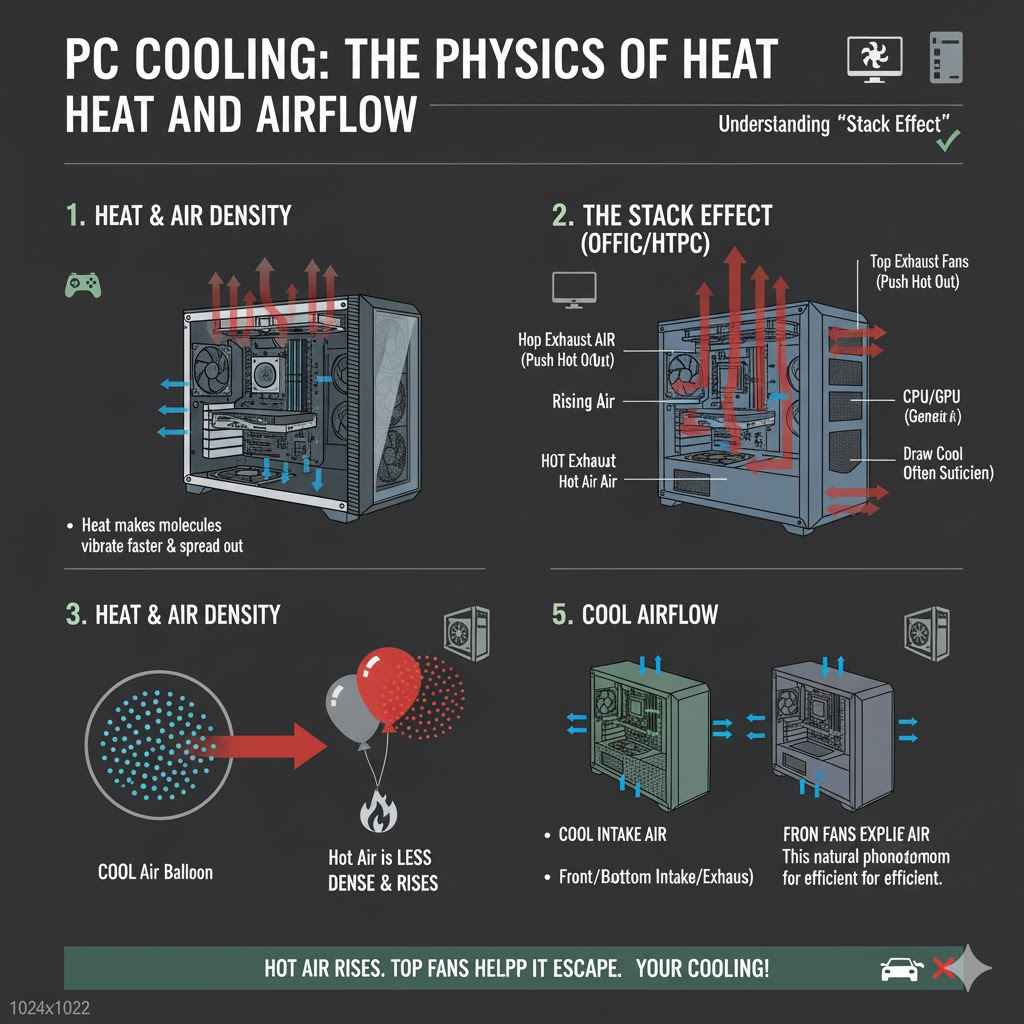
Heat is a form of energy that makes molecules vibrate faster. In a computer, components like the CPU and GPU generate heat as a byproduct of their electrical activity. This heat energy transfers to the surrounding air. According to basic physics, warmer air is less dense than cooler air, causing it to rise. This natural tendency for hot air to move upwards is a fundamental principle in how PC cooling systems are designed.
In a PC case, this means that any heat that accumulates near the top of the enclosure will naturally want to escape upwards. Exhaust fans placed at the top exploit this phenomenon. By actively pushing air out of the case through top-mounted vents, these fans accelerate the removal of hot air. This process is often referred to as the “stack effect” or “chimney effect” in PC building. It works best when there’s a clear path for air to enter from lower points in the case, creating a continuous, upward flow of air that carries heat away from sensitive components.
Why Hot Air Rises
When air particles are heated, they gain energy and move around more vigorously. This increased movement causes the particles to spread out, making the air less dense. Think of it like a balloon: when you heat the air inside, it expands. Because less dense air is lighter than the denser cooler air around it, it floats upwards. This is similar to how a hot air balloon works.
In your computer, the components generate heat, warming the air directly around them. This warmed air, being less dense, rises within the confines of the PC case. If there are openings or fans at the top, this naturally rising hot air can be more easily expelled. This is why strategic placement of exhaust fans, especially at the top, can be very effective for removing heat efficiently from your system.
How Exhaust Fans Contribute to Cooling
Exhaust fans play a crucial role in maintaining a cool environment inside your PC. Their primary function is to draw warm air out of the computer case and expel it. This action is vital for preventing heat buildup. Without effective exhaust, the warm air generated by components would simply recirculate, leading to higher internal temperatures.
When you combine top-mounted exhaust fans with intake fans, you create a directed airflow path. Intake fans, often placed at the front or bottom of the case, pull cooler ambient air into the system. This cool air then flows over components, absorbing heat. The hot air is then pushed towards the exhaust fans, typically located at the rear and top of the case. The top exhaust fans then actively vent this heated air outside the case, ensuring a constant supply of cooler air is available to cool the components.
Creating Positive vs. Negative Air Pressure
Air pressure within a PC case refers to the balance between the amount of air entering and leaving. Positive air pressure occurs when more air is being pushed into the case by intake fans than is being pulled out by exhaust fans. Negative air pressure is the opposite, where more air is being exhausted than is being taken in. Neutral air pressure is when the airflow in and out is roughly balanced.
Each pressure setup has its pros and cons. Positive air pressure can help reduce dust buildup because air will tend to escape from any small gaps in the case, rather than dust being sucked in through those gaps. However, it can also lead to warmer internal temperatures if the exhaust isn’t strong enough to keep up. Negative air pressure can result in better cooling as air is rapidly pulled out, but it can also lead to more dust accumulation because dust can be drawn into the case through any unsealed openings.
Optimizing Airflow Paths
Optimizing airflow means setting up your fans so that air moves efficiently through the case, cooling all components effectively. This involves thinking about where air enters, where it flows, and where it exits. A common and effective strategy is the “front-to-back” or “bottom-to-top” airflow.
With front intake fans, cool air enters the case from the front and is directed towards the rear and top. Rear exhaust fans help pull hot air out from the CPU and GPU areas. Top exhaust fans then capitalize on the rising hot air, pulling it out of the case. This creates a clear path for air, ensuring that heat is consistently removed and cooler air is constantly being supplied. Without proper optimization, air can become stagnant in certain areas, leading to hotspots.
Are Exhaust Fans on Top of a PC Good for Cooling?
So, to directly answer the question, yes, exhaust fans on top of a PC are generally good for cooling, especially when used as part of a well-designed airflow system. As we’ve discussed, hot air naturally rises, and fans at the top directly assist this natural movement, expediting the removal of heat from the case. This can lead to lower overall system temperatures, which is beneficial for component longevity and performance.
The effectiveness of top exhaust fans also depends on the overall fan configuration. If you have strong front intake fans that push a lot of cool air into the case, the hot air will naturally move towards the top. In this scenario, top exhaust fans become highly valuable for efficiently venting that heated air. Without them, the hot air might linger, slowly warming up the internal components. They are not a magic bullet on their own but are a critical component of a balanced cooling solution.
Benefits of Top Exhaust Fans
One of the primary benefits of having exhaust fans at the top of your PC case is their ability to efficiently remove hot air. Since heat rises, these fans act like a chimney, pulling that warm air out of the enclosure. This is particularly beneficial for components that generate a lot of heat, such as the CPU and GPU. By reducing the ambient temperature inside the case, top exhaust fans can help these components run cooler.
Another advantage is that they can help create a more balanced airflow. When combined with front intake fans, they help establish a clear path for air to travel through the case – in from the front, over the components, and out through the top. This consistent flow prevents hot spots from forming and ensures that all parts of your system receive adequate cooling. Some cases also have built-in fan mounts at the top, making installation straightforward.
Reducing Component Temperatures
The most significant benefit of top exhaust fans is their direct impact on component temperatures. When hot air is efficiently removed, the overall internal temperature of the PC case is lowered. This cooler environment directly benefits the CPU, GPU, RAM, and storage drives. For example, a CPU that normally runs at 75 degrees Celsius under load might drop to 68-70 degrees Celsius with well-placed top exhaust fans.
This temperature reduction can have several positive outcomes. First, it helps prevent thermal throttling, a performance-limiting mechanism where components deliberately slow down to avoid overheating. Cooler components can therefore maintain higher clock speeds for longer, leading to better performance in demanding tasks like gaming or video editing. Second, lower operating temperatures can extend the lifespan of your hardware. Heat is a major factor in component degradation over time.
Improved System Stability
Overheating is a common cause of system instability. When your PC’s components get too hot, they can start to malfunction, leading to unexpected shutdowns, freezes, or the dreaded “blue screen of death.” By improving the airflow and actively expelling hot air, top exhaust fans help keep your components within their optimal temperature ranges. This leads to a more stable computing experience.
A stable system means you can rely on your computer to perform tasks without interruptions. For gamers, this means smoother gameplay. For professionals, it means uninterrupted work sessions. The consistent removal of heat ensures that the system’s performance doesn’t degrade due to thermal issues, allowing your hardware to perform at its best consistently.
Aiding the “Chimney Effect”
The “chimney effect” is a natural phenomenon where hot air rises. In a PC case, this means that heat generated by components tends to ascend towards the top of the enclosure. Top exhaust fans are perfectly positioned to take advantage of this. They actively pull this rising hot air outwards, significantly accelerating the heat dissipation process.
When cool air is drawn in from the front or bottom, it flows upwards through the case, picking up heat from components like the CPU cooler and graphics card. By the time this air reaches the top, it’s significantly warmer. Top exhaust fans then efficiently push this warm air out, preventing it from re-circulating and warming up other components. This creates a continuous cycle of cool air in and hot air out, which is essential for effective cooling.
Potential Downsides or Considerations
While top exhaust fans are generally beneficial, there are a few things to keep in mind. One is the potential for increased dust intake if your case’s top panel isn’t well-filtered. Since air is being actively pulled out, any gaps or unfiltered vents at the top can also allow dust to be drawn in from the surrounding environment. This is especially true if you have negative air pressure in your system.
Another consideration is how much noise your fans make. Powerful exhaust fans can sometimes be louder, especially when running at higher speeds. The placement of top fans can also impact how easily you can access or upgrade other components like RAM or the motherboard. However, these are generally minor issues compared to the benefits of improved cooling.
Dust Accumulation and Filtration
Dust is a silent enemy of computer hardware. Over time, dust particles can accumulate on fan blades, heatsinks, and other components, acting as an insulator. This insulation reduces the efficiency of heat dissipation, leading to higher temperatures. If you have top exhaust fans, especially in a system with negative air pressure, dust can be drawn into the case through any available openings.
To combat this, it’s essential to use dust filters on your top fan mounts if your case provides them. Many modern PC cases come with magnetic or clip-on dust filters for the top panel. Regularly cleaning these filters and the interior of your PC will help maintain optimal airflow and prevent dust-related overheating. If your case lacks top dust filters, you might consider purchasing aftermarket ones.
Fan Noise and Speed
The speed at which your fans spin directly impacts their noise level. More powerful exhaust fans, designed to move a large volume of air, can sometimes be quite loud when running at full speed. This can be a concern for users who prefer a quiet computing environment. Modern motherboards and fan controllers allow for fan speed adjustments, often through software or BIOS settings.
You can typically set fans to ramp up only when temperatures reach a certain threshold, or run at a lower, quieter speed for everyday tasks. Finding a balance between effective cooling and acceptable noise levels is key. Some users opt for quieter, higher-quality fans or invest in sound-dampening PC cases to mitigate noise issues.
Accessibility and Component Clearance
The placement of top exhaust fans can sometimes affect accessibility to other components inside the PC case. If the fans are mounted in a way that obstructs access to RAM slots, the CPU socket, or other motherboard components, it can make upgrades or maintenance more difficult. This is something to consider when choosing a PC case or planning your fan configuration.
In some smaller form-factor cases, top-mounted fans might also need to be compatible with the height of your CPU cooler. A very tall CPU cooler might interfere with the installation of top fans, or vice-versa. It’s important to check the specifications of your case and components to ensure there are no clearance issues before purchasing or installing fans.
Real-Life Examples and Scenarios
Consider a gamer playing a graphically intensive game for hours. Their graphics card and CPU are working overtime, generating significant heat. If their PC case has good front intake fans but no top exhaust, the hot air will pool at the top. This can cause the graphics card to “thermal throttle,” reducing frame rates. Adding two 120mm exhaust fans to the top panel can help vent this hot air, keeping the GPU cooler, frame rates higher, and gameplay smoother.
Another example is a content creator editing 4K video. Their workstation’s components are under heavy load for extended periods. A system without adequate exhaust, particularly at the top where heat naturally rises, might experience system slowdowns or even crashes due to overheating. By implementing top exhaust fans, the creator ensures that heat is efficiently removed, leading to a more stable and productive editing session.
Scenario 1 A Budget Gaming PC
Imagine you’ve built a budget gaming PC. You’ve chosen a case with good front airflow but only one rear exhaust fan. During intense gaming sessions, you notice your frame rates dropping after about an hour. You check your system temperatures and see that your CPU is reaching 85 degrees Celsius and your GPU is hitting 80 degrees Celsius. This is causing thermal throttling.
Solution: You decide to add two 120mm exhaust fans to the top of your case. You set them to ramp up with your CPU temperature. After installation and testing, you find that your CPU now tops out at 75 degrees Celsius and your GPU at 72 degrees Celsius during gaming. The frame rate drops are eliminated, and your gaming experience is much more consistent.
Scenario 2 A Home Server
You have a home server that runs 24/7, storing media and running Plex. It’s located in a relatively enclosed space, like a media cabinet. While it doesn’t experience heavy bursts of activity like a gaming PC, consistent warmth can build up over time. This sustained heat can potentially reduce the lifespan of the hard drives and other components.
Solution: You add a single, quiet 140mm exhaust fan to the top of the server case. This fan runs at a low, constant speed. This gentle airflow helps to passively vent any accumulated heat without adding significant noise or power consumption. The result is a slightly cooler internal environment, contributing to the long-term reliability of the server’s components.
Comparison of Fan Placement Strategies
When thinking about PC cooling, fan placement is key. Different arrangements create different airflow patterns and cooling efficiencies. Understanding these patterns helps you make informed decisions about where to put your fans, including those on the top.
Table: Fan Placement Airflow Comparison
| Placement | Primary Role | Airflow Direction | Pros | Cons |
|---|---|---|---|---|
| Front | Intake | Inwards | Pulls cool air into the case | Can be obstructed by drive bays |
| Rear | Exhaust | Outwards | Pulls hot air away from CPU/GPU | Generally limited airflow capacity |
| Top | Exhaust | Outwards | Uses rising hot air; good for GPU cooling | Can draw dust if unfiltered |
| Bottom | Intake | Upwards | Helps GPU cooling by pushing air upward | Can pick up dust from floor |
| Side (if any) | Intake / Exhaust | Varies | Flexible for specific cooling needs | Less common; may disrupt airflow |
How Top Exhaust Fans Work with Others
Top exhaust fans work best when they are part of a balanced system. For instance, if you have strong intake fans at the front of your case, they push a significant amount of cool air inside. This air then flows over your components, absorbing heat. The hot air, being less dense, naturally rises towards the top of the case. Your top exhaust fans are then perfectly positioned to quickly and efficiently push this accumulated hot air out of the case.
This synergy is crucial. Without sufficient intake, your top exhaust fans might just be recycling already warm air. Conversely, with strong intake but no top exhaust, hot air can build up at the top, negating some of the benefits of the front fans. The ideal setup often involves a combination: front intake, rear exhaust, and top exhaust working together to create a consistent and directed airflow path.
Alternatives and Additional Cooling Methods
While fan placement is a primary method of cooling, it’s not the only one. For more demanding systems or for those seeking quieter operation, other cooling solutions exist. These can complement or even replace traditional fan setups.
Liquid Cooling Solutions
Liquid cooling, also known as water cooling, uses a liquid coolant to transfer heat away from components. This system typically involves a pump, radiator, fans, and water blocks that attach to the CPU and GPU. The liquid circulates through the system, picking up heat from the components and then releasing it through the radiator, which is usually mounted on a case fan.
Liquid cooling can offer superior cooling performance compared to air cooling, especially for high-end components. It can also be quieter, as larger radiators with slower-spinning fans can often dissipate more heat than smaller air coolers. Some liquid cooling systems can be customized with multiple radiators and blocks for the CPU and GPU, providing comprehensive cooling for the entire system.
All-In-One (AIO) Coolers
All-in-One (AIO) liquid coolers are pre-assembled, closed-loop systems. They are much simpler to install than custom liquid cooling loops. An AIO typically consists of a pump integrated into the CPU water block, tubing, and a radiator with fans attached. The radiator is usually mounted at the top or front of the PC case.
AIOs offer a good balance of cooling performance and ease of use. They can often outperform large air coolers and provide a more aesthetic look in a PC build. Many users choose AIOs for their ability to keep high-performance CPUs running cool and quiet, even under heavy loads. The fans on the radiator then act as either intake or exhaust, depending on their placement.
High-Performance Air Coolers
For many PC builds, high-performance air coolers are still an excellent and reliable choice. These are significantly larger than stock CPU coolers and feature substantial heatsinks with multiple heat pipes and one or more large fans. They work by drawing cool air from the front or side of the case and directing it over the heatsink’s fins, which then dissipates heat into the surrounding air.
The effectiveness of an air cooler also depends on the case’s airflow. If the case has good intake and exhaust fans, an air cooler can keep even high-end CPUs at very reasonable temperatures. They are generally more affordable than liquid coolers and have fewer potential points of failure, making them a popular choice for many builders.
Are Exhaust Fans on Top of a PC Good for All Builds?
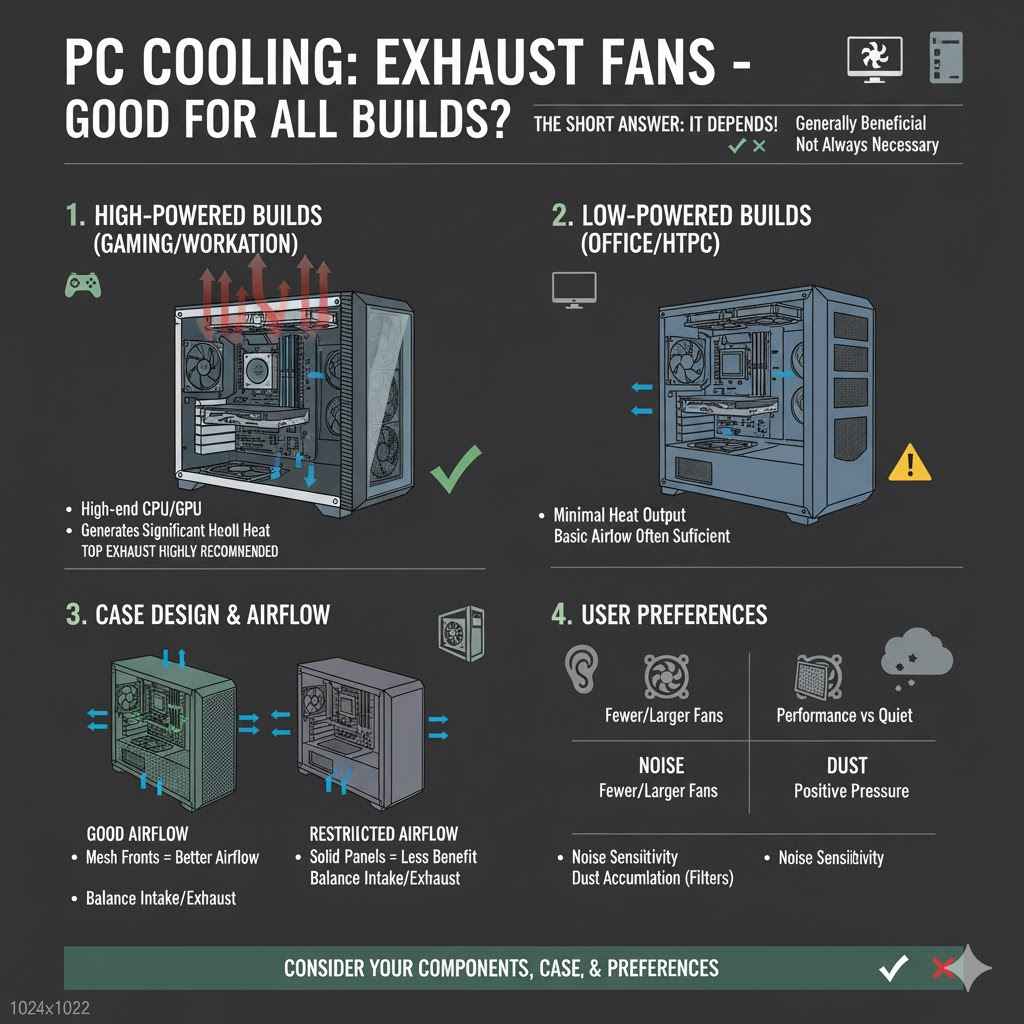
While generally beneficial, the question of whether exhaust fans on top of a PC are “good” for all builds depends on the specific system and its intended use. For high-performance gaming PCs, workstations, or any system with components that generate significant heat, top exhaust fans are highly recommended. They play a vital role in preventing thermal throttling and ensuring stable operation.
However, for very low-power builds, such as basic office PCs or HTPCs (Home Theater PCs) that don’t produce much heat, the benefit might be less pronounced. In such cases, a well-balanced case with just front intake and rear exhaust might suffice. The decision should be based on the heat output of your components and your performance expectations.
Consider Your Components’ Heat Output
The primary factor determining the need for top exhaust fans is the heat generated by your PC’s components. A powerful CPU and a high-end graphics card will produce substantially more heat than an energy-efficient processor designed for general office tasks. If you are using components that are known to run hot or if you plan on overclocking, then robust cooling, including top exhaust fans, becomes much more important.
For example, if you are building a PC for modern AAA gaming or professional video editing, your GPU and CPU will be under heavy load for extended periods. These high-performance parts require efficient heat dissipation. Conversely, if your PC is mainly used for web browsing, email, and word processing, the heat output will be minimal, and less aggressive cooling might be sufficient.
Case Design and Airflow Potential
The design of your PC case itself plays a significant role in how effective any fan configuration will be. Some cases are specifically designed with airflow in mind, featuring mesh front panels, multiple fan mounts, and unobstructed internal layouts. These cases naturally facilitate better airflow, making top exhaust fans very effective.
Other cases, particularly those prioritizing aesthetics with solid front panels or limited ventilation, might not benefit as much from top exhaust fans alone. In such cases, maximizing intake from any available vents and ensuring good rear exhaust becomes even more critical. Always consider the case’s ventilation capabilities when planning your fan setup.
User Preferences for Noise and Dust
Ultimately, your personal preferences for noise levels and dust accumulation also factor into the decision. If you are highly sensitive to fan noise, you might opt for fewer, larger fans running at lower speeds, or invest in quieter fan models. This could influence whether you prioritize top exhaust fans or other cooling methods.
Similarly, if you find cleaning dust to be a chore, you might lean towards setups that minimize dust intake, perhaps favoring positive air pressure with good dust filters. Weighing these personal preferences against the need for optimal cooling will help you determine the best fan configuration for your specific build.
Frequently Asked Questions
Question: Do I need top exhaust fans if my CPU cooler already has one?
Answer: Some CPU coolers have their own exhaust fans that push air directly out the back of the case. While this helps cool the CPU, it doesn’t fully address heat rising from other components like the GPU. Top exhaust fans still contribute to overall case airflow by removing this rising heat.
Question: Can I just use one top exhaust fan?
Answer: Yes, one top exhaust fan can still help remove hot air. However, using two top fans, especially in a mid-tower or larger case, can create a more balanced and effective airflow path by helping to draw air out more efficiently.
Question: Will top exhaust fans make my PC run louder?
Answer: Possibly, especially if they are high-speed fans. However, you can often control fan speeds through your motherboard or software to find a balance between cooling performance and noise levels. Quieter fan models are also available.
Question: Do I need dust filters for top exhaust fans?
Answer: It’s highly recommended, especially if your system has negative air pressure or is in a dusty environment. Dust filters will help prevent dust from being drawn into your case through the top vents.
Question: Are top exhaust fans better than rear exhaust fans?
Answer: They serve slightly different but complementary roles. Rear exhaust fans are crucial for removing heat directly from the rear of components. Top exhaust fans capitalize on rising hot air and are excellent for helping to vent the entire case, especially heat from the GPU.
Wrap Up
Top exhaust fans are generally very good for PC cooling. They efficiently remove rising hot air, helping to keep components cooler and prevent performance issues. This setup is especially beneficial for gaming PCs and workstations with high heat output. Ensure your case has good overall airflow for the best results.


